Command-Line Interface (CLI)
CLI
eIQ Time Series Studio provides a command-line interface (CLI) in addition to the graphical user interface (GUI).
eIQ Time Series Studio CLI enables you to execute commands quickly and requires fewer computing resources than the graphical interface, which is ideal for to use eIQ Time Series Studio features easily, simply, and concisely by entering text commands.
⚠️ Important Notice: The CLI engine and GUI cannot be used at the same time. Please ensure one is shut down before launching the other.
Install
Go to the eIQ Time Series Studio IDE installation path.
Make sure you can find the following files:
tss_cli: The executable file of eIQ Time Series Studio CLI.tss_engine/: The application folder of eIQ Time Series Studio Engine.
Getting started
The following is an overview of the eIQ Time Series Studio Command-Line Interface (TSS CLI). It provides command interfaces for some key features of eIQ Time Series Studio to complete the pipeline from building to deploying a time series model.
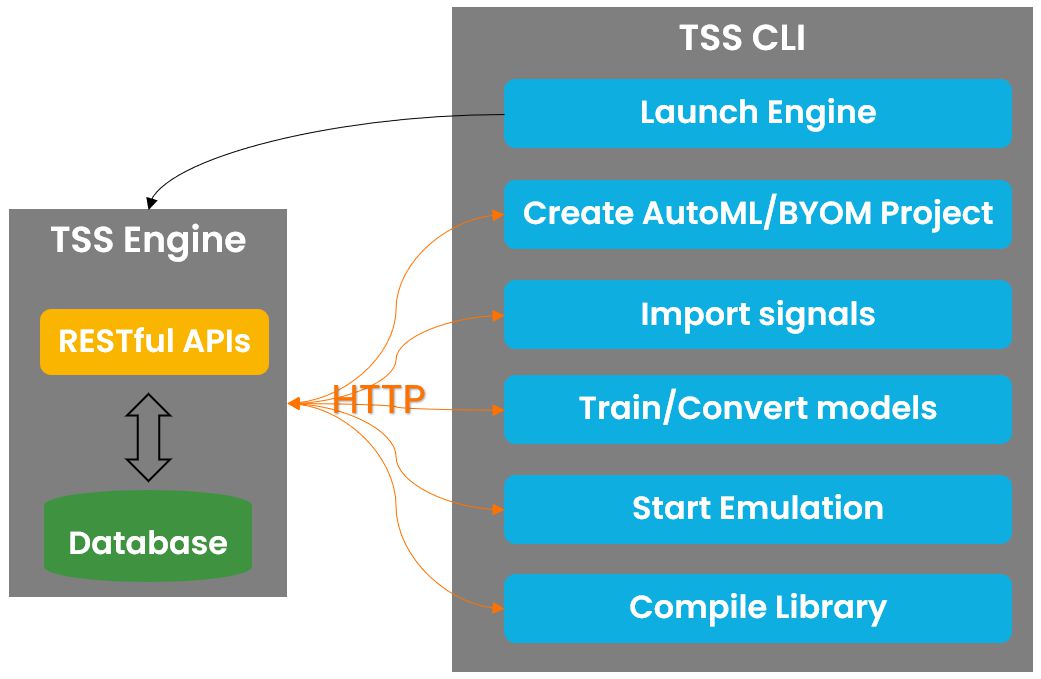
0. Quick Start of CLI:
Engine
- Launch or stop the eIQ Time Series Studio Engine. It is mandatory to have a eIQ Time Series Studio Engine running to use eIQ Time Series Studio CLI.
- Ex: tss_cli engine launch
- ⚠️Notice: After launching the engine, open a new terminal window to send tss_cli commands.
License
- Activate your license. ⚠️Notice: It is mandatory to have a license to use the CLI. If you do not have a license key, register in the IDE first to get one.
- Ex: tss_cli license activate --key MY-LICENSE-KEY
Project
- Create a AutoML or BYOM project.
- (AutoML project creation for AD task) Ex: tss_cli project create --project_name my-project --algo_type ad --device FRDM-MCXN947 --channels 3 --label_target_num 2
- (BYOM project creation for CLS task) Ex: tss_cli project create --project_name my-byom-project --algo_type cls --device FRDM-MCXN947 --channels 3 --label_target_num 2 --conversion
Signal
- Import signals.
- Ex: tss_cli signal import --project_name my-project --signal_name my-signal --file_path /path/to/my/signal --label_id 1 --delimiter " "
Optimization (model training)
- Start optimization, retrieve progress, and get results for AutoML projects.
- (CML optimization) Ex: tss_cli optimization start --project_name my-project --opt_name my-opt --signals 1 2 3 4 5 6
- (DL optimization) Ex: tss_cli optimization start_dl --project_name my-project --opt_name my-dl-opt --signals 1 2 3 4 5 6 --train_model CNN --quant_type INT8
- Ex: tss_cli optimization query|progress|best|results|suspend|resume|stop|delete --project_name my-project --opt_id 1
Conversion
- Start model conversion for Bring Your Own Model (BYOM) projects. ⚠️Notice: BYOM projects need to pass in --opt_id=<conversion_id> when using Emulation or Library commands.
- Ex: tss_cli conversion start --project_name my-byom-project --conversion_name my-conversion --model_path /path/to/my/model --quant_type INT8 --signals 1 2 3 4 5 6
- Ex: tss_cli conversion query|result|delete --project_name my-byom-project --conversion_id 1
Emulation
- Launch a Time Series Emulation. (Support multiple model results to emulate simultaneously)
- Ex: tss_cli emulation launch --project_name my-project --opt_id 1 --result_ids 1 2 3 4 5 --test_file_info Normal /path/to/my/normal/signal "," --test_file_info Anomaly /path/to/my/anomaly/signal ","
Library
- Compile a Time Series Library.
- Ex: tss_cli library compile --project_name my-project --opt_id 1 --result_id 1 --save_path /path/to/my/library --arch cortex-m33 --toolchain GCC
1. Engine: Launch or shutdown eIQ Time Series Studio Engine
Launch the eIQ Time Series Studio Engine on the local computer:
$ tss_cli engine launch --exe_path "</path/to/tss_engine/tss_engine.exe>" --port <port-number> --workspace "</path/to/my/workspace>"
Shutdown the eIQ Time Series Studio Engine on the local computer:
$ tss_cli engine shutdown
Test connection to the eIQ Time Series Studio Engine:
$ tss_cli engine test
Lists all available device information:
$ tss_cli engine device
Lists all available sensor information:
$ tss_cli engine sensor
Get the number of CPU cores on the running machine:
$ tss_cli engine cpu
Get available GPU information on the running machine:
$ tss_cli engine gpu
Usage:
$ tss_cli engine <command> <attributes>

Command:
        launch
                Launch the eIQ Time Series Studio Engine.
                Optional attributes: exe_path, port, workspace
        shutdown
                Shutdown the eIQ Time Series Studio Engine.
        test
                Test connection to the eIQ Time Series Studio Engine.
        device
                Lists all available device information.
        sensor
                Lists all available sensor information.
        cpu
                Get the number of CPU cores on the running machine.
        gpu
                Get available GPU information on the running machine.

Attributes:
        -e, --exe_path file path
                Path to the eIQ Time Series Studio Engine execute file (default `./tss_engine/tss_engine`).
        -p, --port int
                Port of the eIQ Time Series Studio Engine (default 18000).
        -w, --workspace string
                Path to the workspace directory (default `APPDATA/time_series_studio/workspace`).
2. License: activate or deactivate license
Activate a license.
⚠️Notice: It is mandatory to have a license to use the CLI. If you do not have a license key, register in the IDE first to get one. After successfully logging in to your account, you can click on the account name and then click
Copy Licenseto get your license key, which can be used on any platform supported by eIQ Time Series Studio Engine.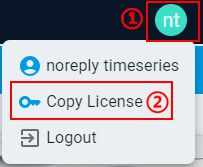
$ tss_cli license activate --key "<MY-LICENSE-KEY>"
Deactivate the license:
$ tss_cli license deactivate
Query current license information:
$ tss_cli license query
Usage:
$ tss_cli license <command> <attributes>

Command:
        activate
                Activate the license.
                Mandatory attributes: key
        deactivate
                Deactivate the license.
        query
                Query current license information.

Attributes:
        -k, --key string
                The license key (If you don't have a license key, register in the IDE first to get one).
Response Info:
Name |
Type |
Description |
Example |
|---|---|---|---|
string |
The user’s email address. |
“noreply.timeseries@nxp.com” |
|
first_name |
string |
The user’s first name. |
“noreply” |
last_name |
string |
The user’s last name. |
“timeseries” |
license_key |
string |
The user’s license key. |
“XXXXXX-XXXXXX-XXXXXX-XXXXXX-XXXXXX-XXXXXX” |
3. Project: create and manage project
List all project information:
$ tss_cli project list
Create an AutoML project:
$ tss_cli project create --project_name "<my-project>" --algo_type "<my-algo-type>" --device "<my-deployed-device>" --channels <number-of-channels> --label_target_num <number-of-label-or-target> \
--sensors "<sensor-name>" <count-of-sensor-channels> \
--sensors "<sensor-name>" <count-of-sensor-channels> \
--sensors ...
Create a BYOM project:
$ tss_cli project create --project_name "<my-byom-project>" --algo_type "<my-algo-type>" --device "<my-deployed-device>" --channels <number-of-channels> --label_target_num <number-of-label-or-target> --conversion
Query project information:
$ tss_cli project query --project_name "<my-project>"
Delete a project:
$ tss_cli project delete --project_name "<my-project>"
Usage:
$ tss_cli project <command> <attributes>

Command:
        list
                List all project information.
        create
                Create a project.
                Mandatory attributes: project_name, algo_type, device, channels, label_target_num
                Optional attributes: max_ram, max_flash, description, conversion, sensors
        query
                Query project information.
                Mandatory attributes: project_name
        delete
                Delete a project
                Mandatory attributes: project_name

Attributes:
        -p, --project_name string
                Name of the project.
        -desc, --description string
                Description of the project.
        -a, --algo_type [ad|cls|reg|oc]
                Set algorithm type from [ad, cls, reg, oc], representing anomaly detection, n-Class classification, 1-Class classification and regression.
        -d, --device string
                Name of deploy device. You can obtain all available device with command: engine device.
        -mf, --max_flash int
                Maximum Flash available for the library in bytes (default is 0, meaning unlimited).
        -mr, --max_ram int
                Maximum RAM available for the library in bytes (default is 0, meaning unlimited).
        -ch, --channels int
                Number of signal channels.
        -ltn, --label_target_num int
                Number of signal targets for regression task, or number of signal labels for anomaly detection, n-Class classification and 1-Class classification tasks.
        -cnv, --conversion bool
                Whether to build a Bring Your Own Model (BYOM) project for model conversion.
        -se, --sensors (string, int)
                List of sensors. Input sensor info with (sensor_name, count_of_sensor_channels). You can obtain all available sensor with command: engine sensor.
Response Info:
Name |
Type |
Description |
Example |
|---|---|---|---|
creation_date |
string |
The creation date of the project. |
“Mon, 09 Dec 2024 11:39:06 GMT” |
name |
string |
Name of the project. |
“my_project” |
description |
string |
Description of the project. |
“This is my project.” |
algo_type |
string |
The algorithm type of the project. |
“ad” |
channels |
int |
Number of signal channels. |
3 |
channel_name_list |
list |
The list of channel name. |
[“x”,”y”,”z”] |
cls_label_num |
int |
Number of labels of the CLS signals. |
2 |
label_id_list |
list |
The list of label id of the AD/CLS/OC signal. |
[1,2] |
label_name_list |
list |
The list of label name of the AD/CLS/OC signal. |
[“Normal”,”Anomaly”] |
reg_target_num |
int |
Number of target of the REG signals. |
2 |
target_info |
list |
The list of target name of the REG signals. |
[“1”,”2”] |
max_ram |
int |
Maximum RAM available for the library, in bytes. |
32000 |
max_flash |
int |
Maximum Flash available for the library in bytes. |
32000 |
device |
string |
Name of deployed device. |
“FRDM-MCXN947” |
device_info |
dict |
Detailed information of deployed device. |
{…} |
sensor_info |
list |
Detailed information of sensor used to collect data. |
[…] |
conversion |
bool |
if is a Bring Your Own Model (BYOM) project. |
false |
summary |
dict |
Summary of signals and optimizations of the project. |
{…} |
4. Signal: import signals
List all signal information:
$ tss_cli signal list --project_name "<my-project>"
Import a signal:
$ tss_cli signal import --project_name "<my-project>" --signal_name "<my-signal>" --file_path "</path/to/my/signal>" --label_id <label-id> --delimiter "<delimiter>"
Query a signal information:
$ tss_cli signal query --project_name "<my-project>" --signal_id <signal-id>
Delete a signal:
$ tss_cli signal delete --project_name "<my-project>" --signal_id <signal-id>
Usage:
$ tss_cli signal <command> <attributes>

Command:
        list
                List all signal information.
                Mandatory attributes: project_name
        import
                Import a signal.
                Mandatory attributes: project_name, signal_name, file_path, label_id
                Optional attributes: delimiter
        query
                Query signal information.
                Mandatory attributes: project_name, signal_id
        delete
                Delete a signal.
                Mandatory attributes: project_name, signal_id

Attributes:
        -p, --project_name string
                Name of the project.
        -sn, --signal_name string
                Name of the signal.
        -si, --signal_id int
                Id of the signal.
        -fp, --file_path file path
                File path to the signal.
        -dlm, --delimiter char
                Signal file value delimiter (default is " ").
        -lid, --label_id int
                Label id of signal (only used for anomaly detection [1:Normal,2:Anomaly], n-Class classification and 1-Class classification tasks).
Response Info:
Name |
Type |
Description |
Example |
|---|---|---|---|
name |
string |
Name of the signal. |
“my_signal” |
id |
int |
Id of signal. |
1 |
delimiter |
string |
Signal file value delimiter. |
“ “ |
file_found |
bool |
If the signal file has been found on the machine. |
true |
file_name |
string |
Signal filename in the workspace. |
“1.csv” |
info |
dict |
Signal file information, such as file_md5, file_size. |
{…} |
passed |
bool |
If check on signal data has been successfully passed. |
true |
label_id |
int |
Label id of the AD/CLS/OC signal. |
1 |
label_name |
string |
Label name of the AD/CLS/OC signal. |
“Normal” |
target_info |
list |
The list of target name of the REG signals. |
[“1”,”2”] |
signal_metadata |
dict |
Metadata of signal data. |
{…} |
5. Optimization: start optimization, retrieve progress, and get the results for AutoML projects.
List all optimization information:
$ tss_cli optimization list --project_name "<my-project>"
Start an optimization for classical machine learning:
$ tss_cli optimization start --project_name "<my-project>" --opt_name "<my-opt>" --signals <signal-id> <signal-id> ... <signal-id> --quick_search
Start an optimization for deep learning:
$ tss_cli optimization start_dl --project_name "<my-project>" --opt_name "<my-dl-opt>" --signals <signal-id> <signal-id> ... <signal-id> --train_model "<train-model>" --quant_type "<quant-type>" --gpu_id <gpu-id>
Query the optimization information:
$ tss_cli optimization query --project_name "<my-project>" --opt_id <my-opt-id>
Suspend an optimization:
$ tss_cli optimization suspend --project_name "<my-project>" --opt_id <my-opt-id>
Resume an optimization:
$ tss_cli optimization resume --project_name "<my-project>" --opt_id <my-opt-id>
Stop an optimization:
$ tss_cli optimization stop --project_name "<my-project>" --opt_id <my-opt-id>
Get the progression of an optimization:
$ tss_cli optimization progress --project_name "<my-project>" --opt_id <my-opt-id>
Get the best result of an optimization:
$ tss_cli optimization best --project_name "<my-project>" --opt_id <my-opt-id>
Get all results list of an optimization:
$ tss_cli optimization results --project_name "<my-project>" --opt_id <my-opt-id>
Get a result information of the optimization:
$ tss_cli optimization result --project_name "<my-project>" --opt_id <my-opt-id> --result_id <result-id>
Delete an optimization:
$ tss_cli optimization delete --project_name "<my-project>" --opt_id <my-opt-id>
Query the supported deep learning model types for the project:
$ tss_cli optimization dl_models --project_name "<my-project>"
Usage:
$ tss_cli optimization <command> <attributes>

Command:
        list
                List all optimization information.
                Mandatory attributes: project_name
        start
                Start an optimization for classical machine learning.
                Mandatory attributes: opt_name, signals
                Optional attributes: on_device_learn, use_generated_anomaly, quick_search, train_val_ratio, shuffling, allocated_cores
        start_dl
                Start an optimization for deep learning.
                Mandatory attributes: opt_name, signals, train_model, quant_type
                Optional attributes: train_val_ratio, shuffling, allocated_cores, gpu_id
        query
                Query the optimization information.
                Mandatory attributes: project_name, opt_id
        delete
                Delete an optimization.
                Mandatory attributes: project_name, opt_id
        suspend
                Suspend an optimization.
                Mandatory attributes: project_name, opt_id
        resume
                Resume an optimization.
                Mandatory attributes: project_name, opt_id
        stop
                Stop an optimization.
                Mandatory attributes: project_name, opt_id
        progress
                Get the progression of an optimization.
                Mandatory attributes: project_name, opt_id
        best
                Get the best result of an optimization.
                Mandatory attributes: project_name, opt_id
        results
                Get all results list of an optimization.
                Mandatory attributes: project_name, opt_id
        result
                Get a result information of the optimization.
                Mandatory attributes: project_name, opt_id, result_id
        dl_models
                Query the supported deep learning model types for the project.
                Mandatory attributes: project_name

Attributes:
        -p, --project_name string
                Name of the project.
        -on, --opt_name string
                Name of the optimization.
        -sigs, --signals list
                List of signal ids.
        -odl, --on_device_learn bool
                Enable on-device learning for AD task.
        -uga, --use_generated_anomaly bool
                Enable using generated anomaly data for AD task.
        -qs, --quick_search bool
                Enable quick search training.
        -tm, --train_model string
                Name of the deep learning model to train (e.g., CNN). Use 'optimization dl_models' to query supported model types for the project.
        -q, --quant_type string
                Quantization type of the configured deep learning model. Available options: INT8, FP32.
        -r, --train_val_ratio float
                The ratio of train set and val set (default 0.8).
        -s, --shuffling bool
                Enable training data shuffling (This setting only applies to regression; enabled by default for other tasks).
        -cores, --allocated_cores int
                Allocated CPU cores. Default: total cores - 4. Use 'engine cpu' to check available cores.
        -gi, --gpu_id int
                GPU ID for model training. Default: -1 (no GPU). Use 'engine gpu' to list available GPUs.
        -oi, --opt_id int
                Id of the optimization. Use 'optimization list' to find the 'id' value for your optimization.
        -ri, --result_id int
                Id of the model result of the optimization. Use 'optimization results' to find the 'id' value for your selected model result.
Response Info:
Name |
Type |
Description |
Example |
|---|---|---|---|
creation_date |
string |
The creation date of the optimization. |
“Mon, 09 Dec 2024 11:42:03 GMT” |
name |
string |
Name of the optimization. |
“my_opt” |
id |
int |
Id of optimization. |
1 |
signals |
list |
List of signal data to be used by the optimization. |
[…] |
max_ram |
int |
Maximum RAM available for the library in bytes. |
32000 |
max_flash |
int |
Maximum Flash is available for the library in bytes. |
32000 |
state |
string |
Status of optimization. |
“Running” |
support_ODL |
bool |
If enable on-device learning for AD task. |
false |
fast_mode |
bool |
If enable quick search training. |
true |
use_generated_anomaly |
bool |
If enable using generated anomaly data for AD task. |
false |
train_val_ratio |
float |
The ratio of train set and val set. |
0.8 |
cpu_info |
dict |
CPU core usage of the optimization. |
{…} |
progress |
dict |
The progress of the optimization. |
{…} |
channel_name_list |
list |
The list of channel name. |
[“x”,”y”,”z”] |
label_id_list |
list |
The list of label id of the AD/CLS/OC signal. |
[1,2,5] |
label_name_list |
list |
The list of label name of the AD/CLS/OC signal. |
[“1”,”2”,”5”] |
target_info |
list |
The list of target name of the REG signals. |
[“1”,”2”] |
model_type |
string |
The type of training models. |
“CML” |
quant_type |
string |
Quantization type of the configured deep learning model. |
“INT8” |
configured_models_info |
list |
The information of configured deep learning models. |
[…] |
version |
string |
The version number of the eIQ Time Series Studio. |
“99.99.0” |
optimization results:
Name |
Type |
Description |
Example |
|---|---|---|---|
id |
int |
Id of the model result of the optimization. |
18 |
is_best |
bool |
If is best in the optimization. |
true |
channels |
int |
Number of signal channels. |
3 |
nb_cols |
int |
Number of signal columns. |
384 |
sp_info |
dict |
Signal processing information of the model. |
{…} |
model_info |
dict |
Model information including name, type and capabilities. |
{…} |
benchmark |
dict |
Benchamark results of performance metrics, memory usage, and execution time. |
{…} |
Emulation |
list |
The emulation results list of the model. |
[…] |
6. Conversion: Start model conversion for Bring Your Own Model (BYOM) projects.
⚠️ Notice: BYOM projects need to pass in –opt_id=<conversion_id> when using Emulation or Library commands.
List all conversion information:
$ tss_cli conversion list --project_name "<my-byom-project>"
Start a model conversion:
$ tss_cli conversion start --project_name "<my-byom-project>" --conversion_name "<my-conversion>" --model_path "</path/to/my/model>" --quant_type "<quant-type>" --signals <signal-id> <signal-id> ... <signal-id>
Query the conversion information:
$ tss_cli conversion query --project_name "<my-byom-project>" --conversion_id <my-conversion-id>
Get the converted model results:
$ tss_cli conversion result --project_name "<my-byom-project>" --conversion_id <my-conversion-id>
Delete a conversion:
$ tss_cli conversion delete --project_name "<my-byom-project>" --conversion_id <my-conversion-id>
Usage:
$ tss_cli conversion <command> <attributes>

Command:
        list
                List all conversion information.
                Mandatory attributes: project_name
        start
                Start a model conversion.
                Mandatory attributes: project_name, conversion_name, model_path, quant_type, signals
        query
                Query the conversion information.
                Mandatory attributes: project_name, conversion_id
        delete
                Delete a conversion.
                Mandatory attributes: project_name, conversion_id
        result
                Get the converted model results.
                Mandatory attributes: project_name, conversion_id

Attributes:
        -p, --project_name string
                Name of the project.
        -cn, --conversion_name string
                Name of the conversion.
        -ci, --conversion_id int
                Id of the conversion.
        -mp, --model_path string
                Path to the model file.
        -q, --quant_type [INT8|FP32]
                Quantization type of the model.
        -sigs, --signals list
                List of signal ids.
Response Info:
Name |
Type |
Description |
Example |
|---|---|---|---|
creation_date |
string |
The creation date of the conversion. |
“Mon, 25 Aug 2025 15:51:33 GMT” |
name |
string |
Name of the conversion. |
“my_conversion” |
id |
int |
Id of conversion. |
1 |
signals |
list |
List of signal data to be used by the conversion. |
[…] |
max_ram |
int |
Maximum RAM available for the library in bytes. |
32000 |
max_flash |
int |
Maximum Flash is available for the library in bytes. |
32000 |
model_path |
string |
Path to the model file. |
“/path/to/my/model” |
label_id_list |
list |
The list of label id of the AD/CLS/OC signal. |
[1,2,5] |
label_name_list |
list |
The list of label name of the AD/CLS/OC signal. |
[“1”,”2”,”5”] |
target_info |
list |
The list of target name of the REG signals. |
[“1”,”2”] |
quant_type |
string |
Quantization type of the model conversion. |
“INT8” |
version |
string |
The version number of the eIQ Time Series Studio. |
“99.99.0” |
7. Emulation: launch time series emulation of multiple model results.
launch an emulation. (Support multiple model results to emulate simultaneously)
$ tss_cli emulation launch --project_name "<my-project>" --opt_id <my-opt-id> --result_ids <result-id> <result-id> ... <result-id> \
--test_file_info "<label-name>" "</path/to/my/test/signal>" "<delimiter>" \
--test_file_info "<label-name>" "</path/to/my/test/signal>" "<delimiter>" \
--test_file_info ...
Retry on an emulation model:
$ tss_cli emulation retry --project_name "<my-project>" --emulation_id <my-emulation-id> --result_id <my-result-id>
Delete an emulation:
$ tss_cli emulation delete --project_name "<my-project>" --emulation_id <my-emulation-id>
Start an emulation for unlabeled test files and return prediction result files:
$ tss_cli emulation predict --project_name "<my-project>" --opt_id <my-opt-id> --result_id <my-result-id> \
--unlabeled_test_file_info "</path/to/my/test/signal>" "<delimiter>" \
--unlabeled_test_file_info "</path/to/my/test/signal>" "<delimiter>" \
--unlabeled_test_file_info ...
Usage:
$ tss_cli emulation <command> <attributes>

Command:
        launch
                Launch an emulation.(Support multiple model results to emulate simultaneously)
                Mandatory attributes: project_name, opt_id, result_ids, test_file_info
        retry
                Retry on an emulation model.
                Mandatory attributes: project_name, emulation_id, result_id
        delete
                Delete an emulation.
                Mandatory attributes: project_name, emulation_id
        predict
                Start an emulation for unlabeled test files and return prediction result files.
                Mandatory attributes: project_name, opt_id, result_id, unlabeled_test_file_info

Attributes:
        -p, --project_name string
                Name of the project.
        -oi, --opt_id int
                Id of the optimization. Use 'optimization list' to find the 'id' value for your optimization.
        -ri, --result_id int
                Id of the model result that need to be emulated. Use 'optimization results' to find the 'id' value for your selected model result.
        -ris, --result_ids list
                List of result_ids of the models that need to be emulated.
        -t, --test_file_info (str, str, str)
                List of labeled test files. Input test file with (label_name, file_path, delimiter). Use 'optimization query' to find available label names; For regression tasks, this label_name is always set to '1'.
        -ut, --unlabeled_test_file_info (str, str)
                List of unlabeled test files. Input test file with (file_path, delimiter).
        -ei, --emulation_id int
                Id of the emulation.
Response Info:
Name |
Type |
Description |
Example |
|---|---|---|---|
creation_date |
string |
The creation date of the emulation. |
“Mon, 09 Dec 2024 11:42:03 GMT” |
emulation_id |
int |
Id of the emulation. |
1 |
emulation_results |
list |
The list of emulation results for each model result. |
[…] |
emulation results:
Name |
Type |
Description |
Example |
|---|---|---|---|
result_id |
int |
Id of the model result of the optimization. |
18 |
status |
string |
The status of the emulation for the model result. |
“Success” |
file_performance |
dict |
The performance of the model result for each test file. |
{…} |
label_performance |
dict |
The performance of the model result for each label in AD/CLS tasks. |
{…} |
total_performance |
dict |
The total performance of the model result. |
{…} |
8. Library: Generates the time series library or sample project.
Compile a Time Series Library for an optimization:
$ tss_cli library compile --project_name "<my-project>" --opt_id <my-opt-id> --result_id <my-result-id> --save_path "</path/to/my/library>" --arch "<arch-type>" --toolchain "<my-toolchain>" --chip "<my-chip>" --fshort_enums --powerquad_enable
Get the sample project for a library:
$ tss_cli library sample_project --project_name "<my-project>" --opt_id <my-opt-id> --result_id <my-result-id> --save_path "</path/to/my/project>" --arch "<arch-type>" --toolchain "<my-toolchain>" --chip "<my-chip>" --neutron_enable
Estimate the inference time of a library:
$ tss_cli library time_estimate --project_name "<my-project>" --opt_id <my-opt-id> --result_id <my-result-id>
Usage:
$ tss_cli library <command> <attributes>

Command:
        compile
                Compile a Time Series Library for an optimization.
                Mandatory attributes: project_name, opt_id, result_id, save_path, arch, toolchain
                Optional attributes: save_name, chip, mfloat_abi, fshort_enums, fshort_wchar, powerquad_enable, neutron_enable
        sample_project
                Get the sample project for a library.
                Mandatory attributes: project_name, opt_id, result_id, save_path, arch, toolchain
                Optional attributes: save_name, chip, mfloat_abi, fshort_enums, fshort_wchar, powerquad_enable, neutron_enable
        time_estimate
                Estimate the inference time of a library.
                Mandatory attributes: project_name, opt_id, result_id

Attributes:
        -p, --project_name string
                Name of the project.
        -oi, --opt_id int
                Id of the optimization.
        -ri, --result_id int
                Id of the model result of the optimization.
        -svp, --save_path string
                The path to the library or sample_project to save.
        -svn, --save_name string
                The name of the library or sample_project to save.
        -ar, --arch [host|cortex-m7|cortex-m4|cortex-m33|cortex-m0plus|DSP56800EF|DSP56800EX]
                Set arch type.
        -cp, --chip string
                Chip part number (default `MCXN947`).
        -t, --toolchain [GCC|IAR|Keil|CodeWarrior]
                Set toolchain type.
        -fabi, --mfloat_abi [soft|hard]
                Select floating-point ABI to use (default `hard`).
        -fse, --fshort_enums bool
                Enable fshort-enums.
        -fsw, --fshort_wchar bool
                Enable fshort-wchar.
        -pq, --powerquad_enable bool
                Enable the PowerQuad accelerator.
        -nt, --neutron_enable bool
                Enable the Neutron accelerator.