Run MCU Profiling
Before deploying to MCU hardware, you can use the MCU Profiling Analysis feature to analyze profiling results from your physical MCU device directly in the eIQ AI Hub.
What is MCU Profiling Analysis?
MCU Profiling Analysis allows you to upload and analyze profiling results generated on your physical MCU device. This tool does not perform profiling runs on its own — you use MCUXpresso to run the profiling externally, and then upload the resulting JSON file to the AI Hub for parsing and analysis.
The tool provides:
Per-node execution time analysis
Operator-level profiling statistics
Total inference time estimation
Tensor arena size information
Visual breakdown of model performance on MCU targets
Upload a Profiling JSON File
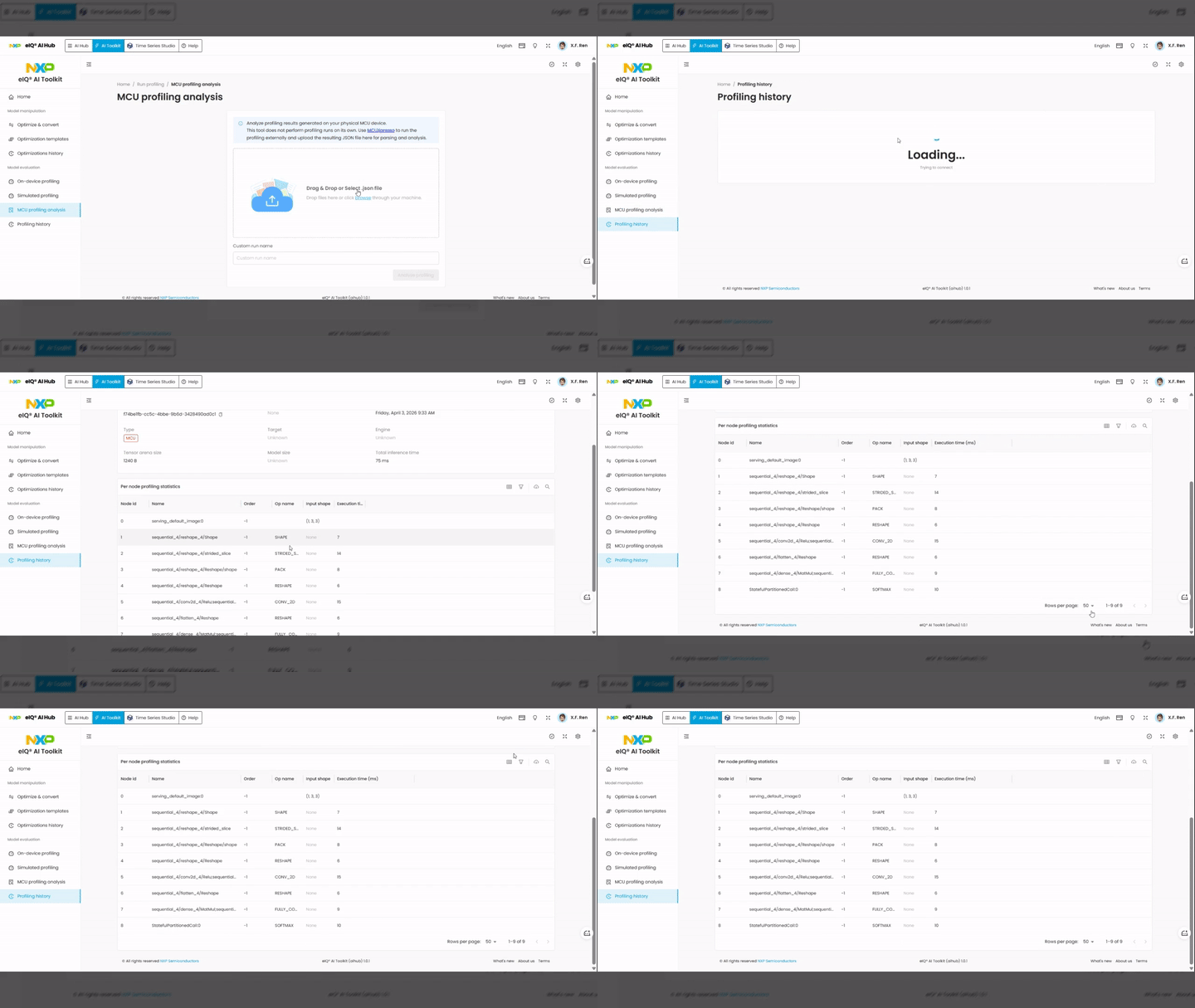
The MCU Profiling Analysis page lets you upload a JSON profiling output file generated by MCUXpresso and analyze the results in the AI Hub.
Steps:
Switch to the AI Toolkit tab in the top navigation bar.
In the left sidebar, under Model evaluation, click MCU profiling analysis.
On the MCU profiling analysis page, review the information box explaining the workflow.
Upload your profiling JSON file:
Drag and drop the
.jsonfile into the upload area, or click browse to select the file from your local machine.After uploading, the file name appears in the upload area. Click Remove to delete it if needed.
Optionally, enter a Custom run name to label this profiling session.
Click the Analyse profiling button to start the analysis.
Review Profiling Results
After the analysis completes, navigate to Profiling history in the left sidebar to view the results. Click on the entry to open the detailed profiling report.
Session metadata includes:
Type —
MCUTarget — target device information
Engine — NPU engine used
Tensor arena size — memory arena allocated for tensor operations
Model size — size of the model file
Total inference time — total inference time in milliseconds
Per-node profiling statistics table:
Node id — unique identifier for each operator node
Name — name of the operator node
Order — execution order of the node
Op name — type of operation (e.g.,
CONV_2D,RESHAPE,FULLY_CONNECTED)Input shape — input tensor dimensions
Execution time — execution time in milliseconds for that node
Use these results to identify performance bottlenecks and validate that the model meets your latency requirements for MCU deployment.
Note
Please refer to AI Toolkit document for detailed information.