Deployment
❗Important: The library generated by eIQ Time Series Studio is licensed exclusively for use on NXP devices. It must be implemented and deployed solely on NXP products.
To generate and deploy the optimized algorithm, switch to the “Deployment” tab after completing Emulation and determining the best model. Deployment generates the optimized algorithm library and sample project and offloads to the edge devices.
The deployment section is the Final step of the pipeline. This section provides steps to generate and deploy the library for your own project on the target devices.
Notes: Deployment requires public network support because the Cloud Server dynamically generates target libraries specific to your CPU, model, and IDE.
Function Layout
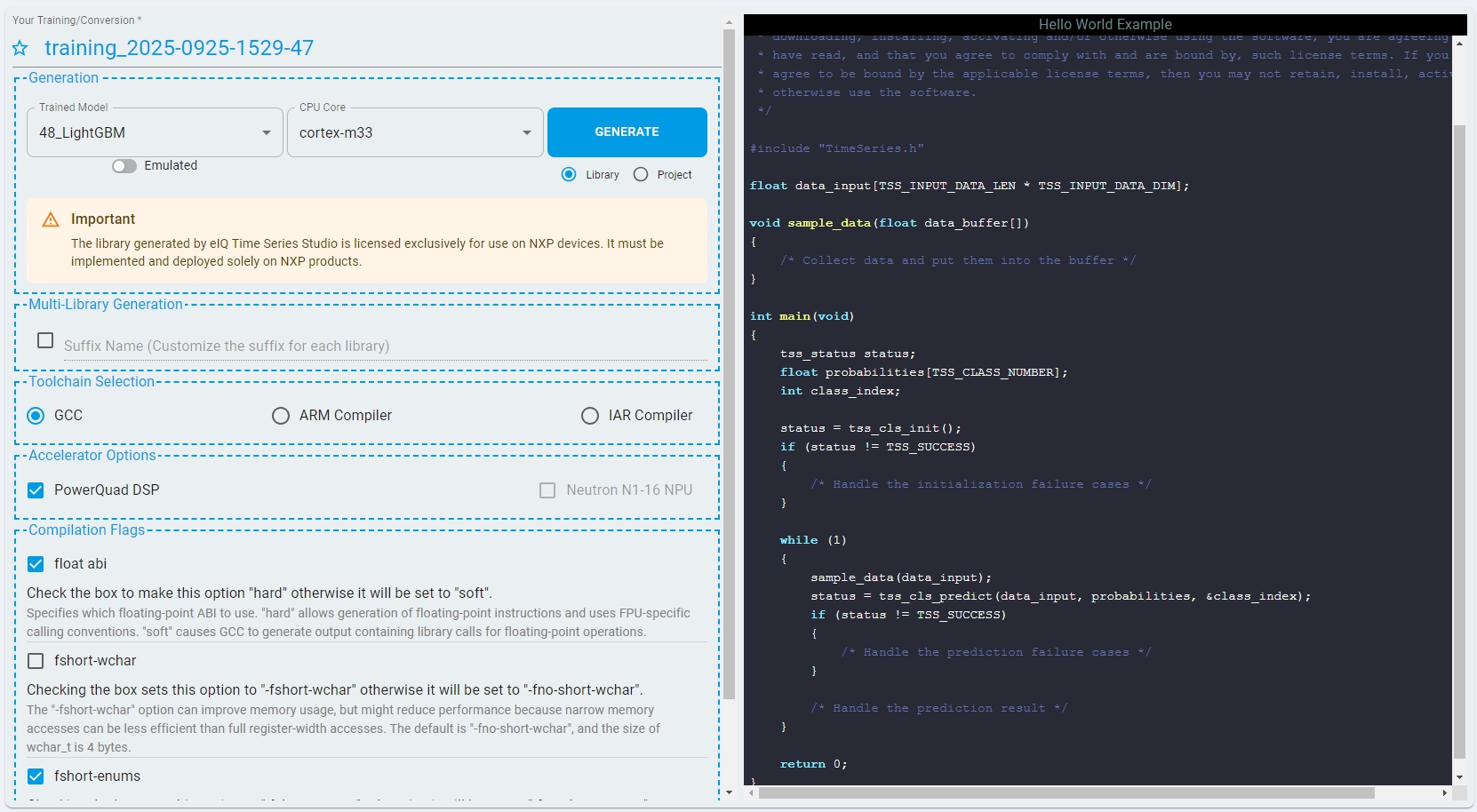
There are six main functions currently supported by the deployment section of eIQ Time Series Studio:
Supports multiple Compilers.
Supports multiple Target Architectures.
Supports Arm Cortex M Compilation Flags.
Supports hardware Accelerator Options.
Supports multilibrary generation.
Clear step-by-step instructions to generate your own library.
Cloud-based Algorithm Library Integration.
QuickStart sample project (MCUXpresso).
Supported Compilers
eIQ Time Series Studio supports the following compilers:
GCC (MCUXpresso, GNU ARM Embedded Toolchain)
Arm Compiler (Keil MDK)
IAR Compiler (IAR Embedded Workbench For Arm)
CodeWarrior (CodeWarrior Development Studio For DSC)

CodeWarrior (CodeWarrior Development Studio For DSC)

Supported Architectures
Arm Cortex-M series (widely used in microcontrollers)
NXP DSC cores (Digital Signal Controllers)
Arm Cortex-A series (via GCC)
Supported Compilation Flags
The supported compilation flags are:
float-abi: Specifies which floating-point ABI to use. (hard/soft). The default is hard.
fshort-wchar: Sets the size of wchar_t. The default is -fno-short-wchar.
fshort-enums: Helps the compiler to set the size of an enumeration type to the smallest data type that can hold all enumerator values. The default is -fshort-enums for GCC, and -fno-short-enums for Arm Compiler.
Notes: Reference comes from the Arm Compiler Reference Guide.
Supported Accelerator Options
PowerQuad DSP Helps accelerate FFT calculation. The selected target needs to contain this hardware.
Neutron NPU Helps accelerate prediction for the DL model. The selected target needs to contain this hardware.
Multilibrary Generation
The purpose of Multi-Library is to enable users to link multiple TSS libraries within the same project/device. In the industrial and home appliance sectors, projects integrate various types and models of sensors that simultaneously provide independent time series data at different sampling rates.
The introduction of Multi-Library allows users to deploy corresponding TSS libraries for each independent set of time series data. These libraries can consist of different algorithm types (Anomaly Detection, Classification, Regression), and you can either handle the inference results separately or combine them to decide.

Differentiate these libraries by entering customized suffix names in the Deployment section. The suffix is used for generating library file, header file, macro definitions and APIs within the header file, and the filenames of the library and header file. By calling APIs with different suffix names, the corresponding TSS library can be invoked.
Notes: The generation of sample projects is not supported when the multilibrary generation is enabled.
Deployment Process
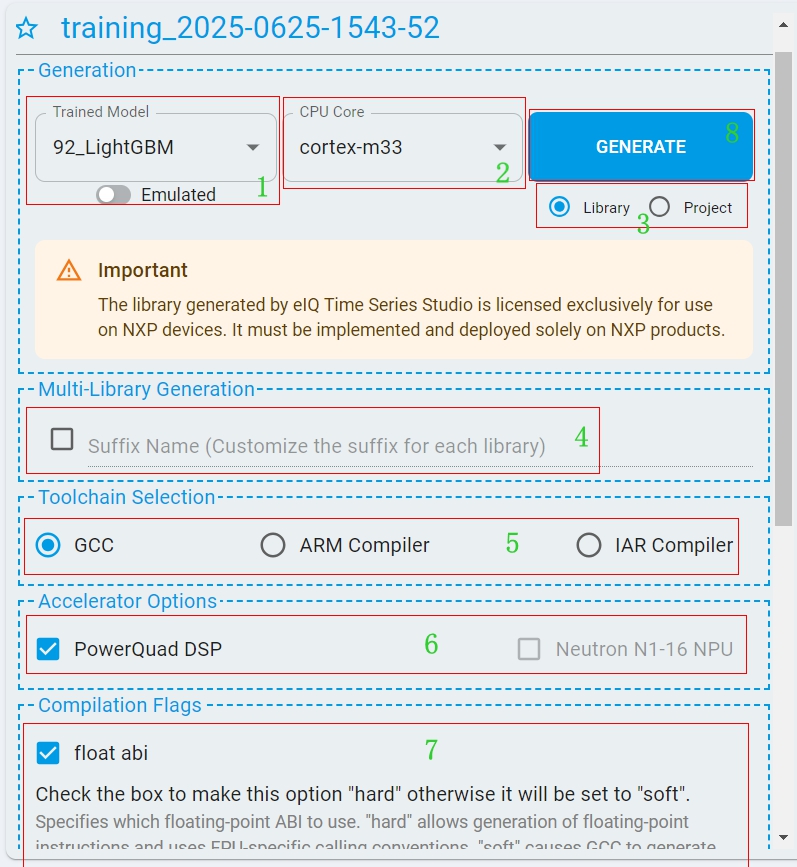
Follow the steps and generate your own time series library and deploy it to your devices:
Step 1. Select the target
model, verified in the Emulation process with the best quality. The model list shows the trained or emulated models by the switcher.Step 2. Select the
CPU coreyou want to deploy to the target board, which you selected in the project settings.Step 3. To generate the library or the project, click
radio. NXP supports the MCUXpresso project only.Step 4. Set the
Suffix Nameof the library when developing a multilibrary project.Step 5. Choose the compiler for development. DSC core uses “CodeWarrior”.
Step 6. Set the hardware Accelerator Options if supported.
Step 7. Select the best
Compilation Flagsfor the specific compiler to deploy. Check the description.Step 8. To generate the target algorithm library or the whole project from the Cloud, click the
GENERATEbutton.Step 9. Once the generation process completes, a pop-up dialog box shows the
download zip package. To access the target files, unzip the compressed library.Step 10.
Linkthe library to your own project or directlyimportthe generated project in the MCUXpresso IDE.Buildthe project andflashto the target.
Algorithm Library Integration
eIQ Time Series Studio Library (libtss) is an algorithm library for edge devices. The time series cloud server dynamically generates embedded C code and cross-compiles based on your specific hardware and compiler information.
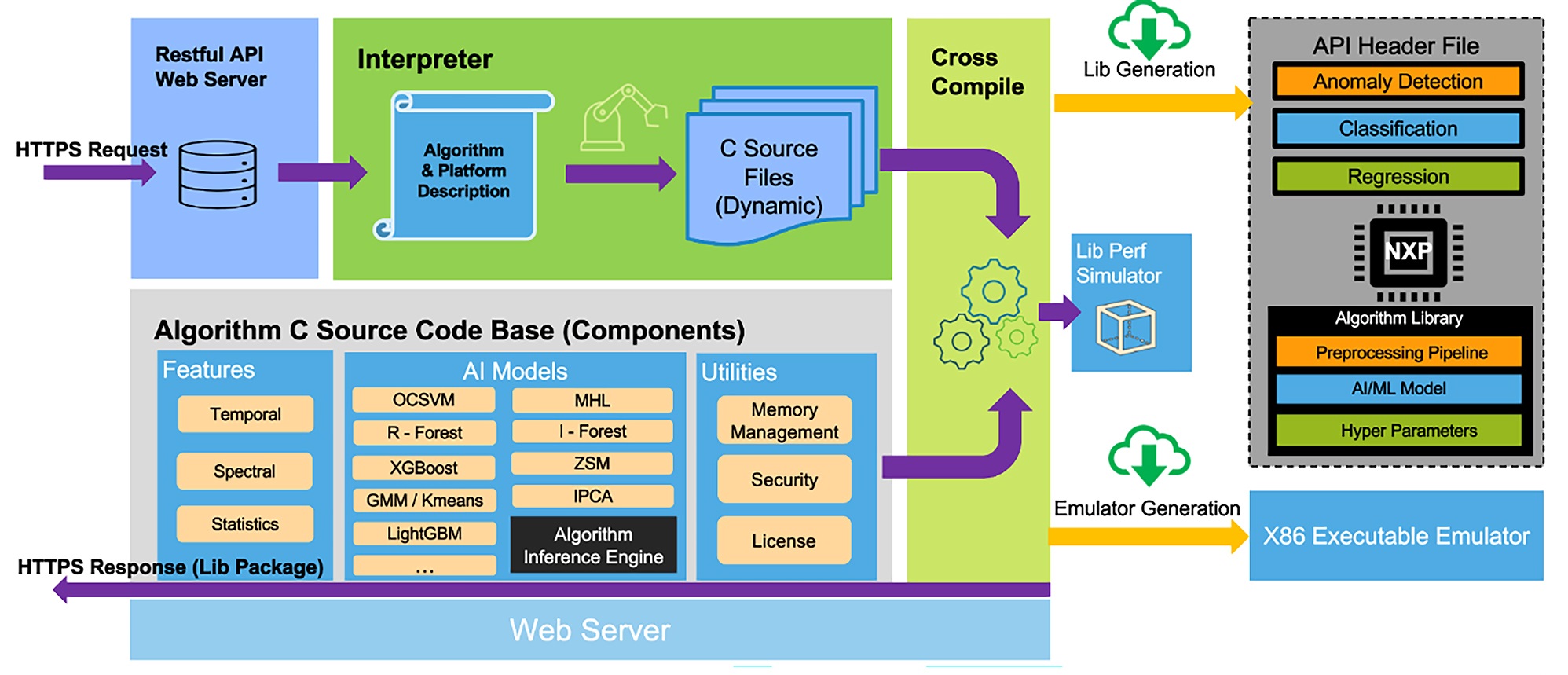
The file tree of the generated algorithm library is shown as below:
    📦_libtss
    ┣ 📜algorithm.dat
    ┣ 📜libtss.a
    ┣ 📜LICENSE.txt
    ┣ 📜metadata.json
    ┗ 📜TimeSeries.h
algorithm.dat: The encrypted file with the algorithm details. NXP cloud server can parse and generate the source code.
libtss.a: The core algorithm library, developers use it for algorithm integration. (If Arm Compiler or CodeWarrior is selected, the generated library is tss.lib)
LICENSE.txt: NXP online code hosting software license agreement.
metadata.json: The meta description file for the generated algorithm. The file contains key information like compiler type, task type, input dataset, and platform information. The file also contains the minimum memory size as reference.
TimeSeries.h: The API header file for the libtss.a, developers use it for the algorithm integration.
Sample code: *main.c Integrates the sample code to your project to QuickStart with the generated library (completed by the user).
Sample code (Anomaly detection)
/*
* Copyright 2024-2025 NXP
* NXP Proprietary. This software is owned or controlled by NXP and may only be used
* strictly in accordance with the applicable license terms. By expressly accepting such terms or by
* downloading, installing, activating and/or otherwise using the software, you are agreeing that you
* have read, and that you agree to comply with and are bound by, such license terms. If you do not
* agree to be bound by the applicable license terms, then you may not retain, install, activate or
* otherwise use the software.
*/

#include "TimeSeries.h"

float data_input[TSS_INPUT_DATA_LEN * TSS_INPUT_DATA_DIM];

void sample_data(float data_buffer[])
{
    /* Collect data and put them into the buffer */
}

int main(void)
{
    tss_status status;
    float probability;

#ifdef SUPPORT_ODL
    status = tss_ad_init(NULL);
    if (status != TSS_SUCCESS)
    {
        /* Handle the initialization failure cases */
    }

    /*You can customize the learning number, but use a number greater than TSS_RECOMMEND_LEARNING_SAMPLE_NUM for better results.*/
    int learning_num = TSS_RECOMMEND_LEARNING_SAMPLE_NUM;
    for (int i = 0; i < learning_num; i++)
    {
        sample_data(data_input);
        status = tss_ad_learn(data_input);
        if (status != TSS_SUCCESS && status != TSS_LEARNING_NOT_ENOUGH)
        {
            /* Handle the learning failure cases */
        }
    }
#else
    status = tss_ad_init();
    if (status != TSS_SUCCESS)
    {
        /* Handle the initialization failure cases */
    }
#endif

    while (1)
    {
        sample_data(data_input);
        status = tss_ad_predict(data_input, &probability);
        if (status != TSS_SUCCESS)
        {
            /* Handle the prediction failure cases */
        }

        /* Handle the prediction result */
    }

    return 0;
}
Sample code (n-Class Classification)
/*
 * Copyright 2024-2025 NXP
 * NXP Proprietary. This software is owned or controlled by NXP and may only be used
 * strictly in accordance with the applicable license terms. By expressly accepting such terms or by
 * downloading, installing, activating and/or otherwise using the software, you are agreeing that you
 * have read, and that you agree to comply with and are bound by, such license terms. If you do not
 * agree to be bound by the applicable license terms, then you may not retain, install, activate or
 * otherwise use the software.
 */

#include "TimeSeries.h"

float data_input[TSS_INPUT_DATA_LEN * TSS_INPUT_DATA_DIM];

void sample_data(float data_buffer[])
{
    /* Collect data and put them into the buffer */
}

int main(void)
{
    tss_status status;
    float probabilities[TSS_CLASS_NUMBER];
    int class_index;

    status = tss_cls_init();
    if (status != TSS_SUCCESS)
    {
        /* Handle the initialization failure cases */
    }

    while (1)
    {
        sample_data(data_input);
        status = tss_cls_predict(data_input, probabilities, &class_index);
        if (status != TSS_SUCCESS)
        {
            /* Handle the prediction failure cases */
        }

        /* Handle the prediction result */
    }

    return 0;
}
Sample code (1-Class Classification)
/*
 * Copyright 2025 NXP
 * NXP Confidential and Proprietary. This software is owned or controlled by NXP and may only be used
 * strictly in accordance with the applicable license terms. By expressly accepting such terms or by
 * downloading, installing, activating and/or otherwise using the software, you are agreeing that you
 * have read, and that you agree to comply with and are bound by, such license terms. If you do not
 * agree to be bound by the applicable license terms, then you may not retain, install, activate or
 * otherwise use the software.
 */

/* Decision score indicating anomaly/outlier status. Positive values (score > 0) indicate normal samples,
 * while negative values suggest outliers/anomalies. is_outlier flag is derived by thresholding at 0.
 */

#include "TimeSeries.h"

float data_input[TSS_INPUT_DATA_LEN * TSS_INPUT_DATA_DIM];

void sample_data(float data_buffer[])
{
    /* Collect data and put them into the buffer */
}

int main(void)
{
    tss_status status;
    int is_outlier;
    float score;

    status = tss_oc_init();
    if (status != TSS_SUCCESS)
    {
        /* Handle the initialization failure cases */
    }

    while (1)
    {
        sample_data(data_input);
        status = tss_oc_predict(data_input, score, is_outlier);
        if (status != TSS_SUCCESS)
        {
            /* Handle the prediction failure cases */
        }

        /* Handle the prediction result */
    }

    return 0;
}
Sample code (Regression)
/*
 * Copyright 2024-2025 NXP
 * NXP Proprietary. This software is owned or controlled by NXP and may only be used
 * strictly in accordance with the applicable license terms. By expressly accepting such terms or by
 * downloading, installing, activating and/or otherwise using the software, you are agreeing that you
 * have read, and that you agree to comply with and are bound by, such license terms. If you do not
 * agree to be bound by the applicable license terms, then you may not retain, install, activate or
 * otherwise use the software.
 */

#include "TimeSeries.h"

float data_input[TSS_INPUT_DATA_LEN * TSS_INPUT_DATA_DIM];

void sample_data(float data_buffer[])
{
    /* Collect data and put them into the buffer */
}

int main(void)
{
    tss_status status;
    float targets[TSS_TARGET_NUMBER];

    status = tss_reg_init();
    if (status != TSS_SUCCESS)
    {
        /* Handle the initialization failure cases */
    }

    while (1)
    {
        sample_data(data_input);
        status = tss_reg_predict(data_input, targets);
        if (status != TSS_SUCCESS)
        {
            /* Handle the prediction failure cases */
        }

        /* Handle the prediction result */
    }

    return 0;
}
Notes: The above example is a “Hello World” level code to illustrate the use of the algorithm library for different tasks.
API Reference
Files
TimeSeries.h: The API header file for the libtss.a, developers use it for the algorithm integration.
#include "TimeSeries.h"
Enumerations
| name | description | |
|---|---|---|
| typedef | tss_status | Error status returned functions in the eIQ Time Series Studio library. |
typedef enum
{
    TSS_SUCCESS                 = 0, /* No error */
    TSS_STATE_ERROR             = 1, /* State is incorrect */
    TSS_BOARD_ERROR             = 2, /* Board information is incorrect */
    TSS_MEMORY_ERROR            = 3, /* Memory error caused by the HEAP Overflow */
    TSS_PREDICT_NOT_ENABLED     = 4, /* Predict function is not enabled */
    TSS_LEARNING_ERROR          = 5, /* Errors occurs during the learning process */
    TSS_LEARNING_NOT_ENOUGH     = 6, /* Not enough calls to learning */
    TSS_RECOMMEND_LEARNING_DONE = 7, /* Reached the recommended calls to learning */
    TSS_NOT_READY               = 8, /* Function is not ready but planed to support */
    TSS_LICENSE_ERROR           = 9, /* Invalid license */
    TSS_UNKNOWN_ERROR           = 10, /* Unknown error */
} tss_status;
Macros
Defined in the Anomaly Detection Library.
Notes: Part of macros only exist if the On-Device Learn option is selected in the training config.
| name | description | |
|---|---|---|
| #define | ANOMALY_DETECTION_LIB_ID | Identifier for the Anomaly Detection library. |
| #define | TSS_INPUT_DATA_LEN | The sample point of the input_data (Depends on the Sampling Frequency). |
| #define | TSS_INPUT_DATA_DIM | The dimension/(Sensor channels) of the input_data. |
| #define | USE_ANOMALY_DETECTION | Macro is used to distinguish the algorithm types. |
| #define | TSS_RECOMMEND_THRESHOLD | Recommend threshold of the likelihood probability. |
| #define | SUPPORT_ODL | Support On Device Learning if the Marco is defined. |
| #define | MODEL_SIZE | The array size of the model_buffer (which can be imported and exported). |
| #define | TSS_RECOMMEND_LEARNING_SAMPLE_NUM | Recommend learning sample number for the On-Device Learn algorithm. |
Defined in n-Class Classification library.
| name | description | |
|---|---|---|
| #define | CLASSIFICATION_LIB_ID | Identifier for the Classification library. |
| #define | TSS_INPUT_DATA_LEN | The sample point of the input_data (Depends on the Sampling Frequency). |
| #define | TSS_INPUT_DATA_DIM | The dimension/(Sensor channels) of the input_data. |
| #define | USE_CLASSIFICATION | Macro is used to distinguish the algorithm types. |
| #define | TSS_CLASS_NUMBER | Total number of classes labels for model inference. |
Defined in 1-Class Classification library. | | name | description | | ——- | ——————– | ———————————————————————- | | #define | ONE_CLASS_LIB_ID | Identifier for the One-Class Classification library. | | #define | TSS_INPUT_DATA_LEN | The sample point of the input_data (Depends on the Sampling Frequency).| | #define | TSS_INPUT_DATA_DIM | The dimension/(Sensor channels) of the input_data. | | #define | USE_ONE_CLASS | Macro is used to distinguish the algorithm types. |
Defined in Regression library.
| name | description | |
|---|---|---|
| #define | REGRESSION_LIB_ID | Identifier for the Regression library. |
| #define | TSS_INPUT_DATA_LEN | The sample point of the input_data (Depends on the Sampling Frequency). |
| #define | TSS_INPUT_DATA_DIM | The dimension/(Sensor channels) of the input_data. |
| #define | USE_REGRESSION | Macro is used to distinguish the algorithm types. |
| #define | TSS_TARGET_NUMBER | The number of target variables of the regression algorithm. |
Variables
Defined in Anomaly Detection (Support On-Device Learn) library only.
| name | description | description size |
|---|---|---|
| model_buffer | The static array that stores the model hyperparameters (derived from the eIQ Time Series Studio). | MODEL_SIZE |
| data_input | Time Series raw Data collected from the sensors, which is the data input for learning and predicting. eIQ Time Series Studio library accepts float data types only. | TSS_INPUT_DATA_LEN * TSS_INPUT_DATA_DIM |
| probability | The float type probability in model prediction, ranging from [0,1], indicates the probability that the model predicts a sample belongs to the learned pattern. | float |
Functions
Notes: All the functions return
tss_statusenumeration as the function output. The tss_status represents the status of each function.
Anomaly Detection
eIQ Time Series Studio generates two different sets of APIs in the Anomaly Detection task (depends on the training configuration), On-Device Learn and Predict-Only.
I. On-Device Learn
- tss_status tss_ad_init(const float model_buffer[])
-
Initialize the anomaly detection algorithm with the specified model. The model buffer is derived from the training stage of the eIQ Time Series Studio. If the input is NULL, call the tss_ad_init function resets the model.
| Parameters | type | data type | description |
|---|---|---|---|
| model_buffer | input | const float Array | The model buffer for initialization, NULL means reset the model. |
- tss_status tss_ad_learn(const float data_input[])
-
This function enables the model to continue learning normal patterns on the device. If the specified model buffer is not loaded during initialization, it can start learning new normal patterns from scratch.
| Parameters | type | data type | description |
|---|---|---|---|
| data_input | input | const float Array | The data input for the learning. |
- tss_status tss_ad_export(float model_buffer[])
-
This function allows the user to save the learned model to the specified buffer. The buffer must be prepared by the user before calling the function.
| Parameters | type | data type | description |
|---|---|---|---|
| model_buffer | input | float array | The model buffer to export. |
- tss_status tss_ad_predict(const float data_input[], float *probability)
-
Predict the normal probability of the specified data.
| Parameters | type | data type | description |
|---|---|---|---|
| data_input | input | const float array | The data input for the prediction. |
| probability | output | float * | The predicted probability output. A value of 0 represents that the sample has absolutely no chance of being normal, while a value of 1 represents that the sample is definitely normal. |
II. Predict-Only
- tss_status tss_ad_init(void)
-
Initialize the anomaly detection algorithm.
- tss_status tss_ad_predict(const float data_input[], float *probability)
-
Predict the normal probability of the specified data.
| Parameters | type | data type | description |
|---|---|---|---|
| data_input | input | const float array | The data input for the prediction. |
| probability | output | float * | The predicted probability output. A value of 0 represents that the sample has absolutely no chance of being normal, while a value of 1 represents that the sample is definitely normal. |
n-Class Classification
- tss_status tss_cls_init(void)
-
Initialize the multi-class classification algorithm.
- tss_status tss_cls_predict(const float data_input[], float probabilities[], int *class_index)
-
Predict the probabilities and class index/label of the specified data.
| Parameters | type | data type | description |
|---|---|---|---|
| data_input | input | const float array | The data input for the prediction. |
| probabilities | output | float array | The predicted probabilities of all classes. |
| class_index | output | int | The predicted class index/label. |
1-Class Classification
- tss_status tss_oc_init(void)
-
Initialize the one class classification algorithm.
- tss_status tss_oc_predict(const float data_input[], float *score, int *is_outlier)
-
Predict the decision score and determine if the input data belongs to the positive class.
| Parameters | type | data type | description |
|---|---|---|---|
| data_input | input | const float array | The data input for the prediction. |
| score | output | float | The decision score indicating the sample's deviation from the positive class. |
| is_outlier | output | int | A flag indicating whether the sample is an outlier (1) or belongs to the positive class (0). |
Regression
- tss_status tss_reg_init(void)
-
Initialize the regression algorithm.
- tss_status tss_reg_predict(const float data_input[], float targets[])
-
Predict the targets based on the specified data.
| Parameters | type | data type | description |
|---|---|---|---|
| data_input | input | const float array | The data input for the prediction. |
| targets | output | float array | The predicted targets output, eIQ Time Series Studio supports multitargets prediction. |
Algorithm Project Execution
eIQ Time Series Studio helps generate the sample project, which can be directly imported in the MCUXpresso IDE. The sample project contains a generated algorithm library, time series framework, your target project driver, settings, and components. You can take the sample project as a QuickStart of your own library.
Sample project workflow overview:
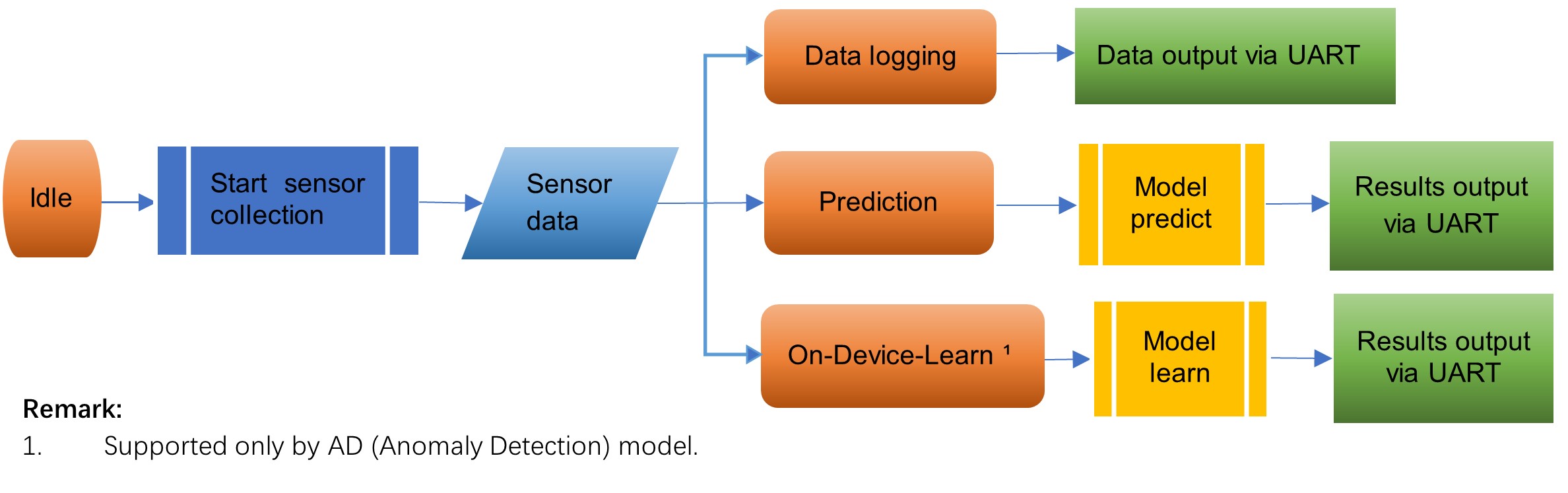
Idle state. Ready to handle the SHELL commands and collect the sensor data by the sensor HAL in time series framework.
Data log state. Print the sensor data via SHELL over UART.
Prediction state. Predict based on the sensor data by the generated model library and print the results via SHELL over UART.
On-device-Learn state. Learn a new model from the sensor data by the generated model library and print the results via SHELL over UART.
Sample Projects key features:
QuickStart with your library on the target Edge Device.
User-friendly SHELL in the serial terminal, start the learning/prediction process with commands.
Provides an option to log the data when the target has an embedded sensor (accelerator).
To test the library without a physical sensor as the data input, use a dummy sensor HAL in the Time Series framework.
Based on the MCX-N9XX-EVK, the file tree of the generated sample project is shown as below.
    📦MCX-N9XX-EVK
    ┣ 📂Framework                    time series framework based on the FreeRTOS.
    ┃ ┣ 📂core
    ┃ ┣ 📂docs
    ┃ ┣ 📂hal                        Hardware Abstraction Layer.
    ┃ ┃ ┣ 📂inc
    ┃ ┣ 📂inc
    ┗ 📂MCX-N9XX-EVK                 Base Project.
    ┃ ┣ 📂CMSIS
    ┃ ┣ 📂board
    ┃ ┣ 📂component
    ┃ ┣ 📂device
    ┃ ┣ 📂drivers
    ┃ ┣ 📂freertos
    ┃ ┣ 📂source
    ┃ ┃ ┣ 📂TimeSeries              Generated time series library.
    ┃ ┃ ┣ 📜FreeRTOSConfig.h        FreeRTOS config header file.
    ┃ ┃ ┣ 📜cpp_config.cpp
    ┃ ┃ ┣ 📜hardware.c              Config file of the hardware/sensors.
    ┃ ┃ ┣ 📜lptmr.c
    ┃ ┃ ┣ 📜lptmr.h
    ┃ ┃ ┣ 📜main.c                  Main program.
    ┃ ┃ ┣ 📜memory.c
    ┃ ┃ ┗ 📜semihost_hardfault.c
    ┃ ┣ 📂startup
    ┃ ┣ 📂usb
    ┃ ┣ 📂utilities
    ┃ ┣ 📜.cproject
    ┃ ┣ 📜.gitignore
    ┃ ┣ 📜.project
    ┃ ┗ 📜README.pdf                User Guide of the sample project.
SHELL Interface
After clicking GENERATE with the project option and completing the build-flash steps, the time series sample project flashes directly into your device. Open the Serial Terminal and start the execution:

The command-line interface is straightforward as reflected in the output from help:
"help": List all the registered commands

"exit": Exit program

"start <log|learn|pre>: Start an execution
- log: Start data logger
- learn: Start time series learning
- reset: Start time series knowledge reset
- pre: Start time series prediction

"stop": Stop ongoing execution

"setup <odr|fsr|sc|thold> <value>: Setup a parameter
- odr: Setup output data rate
- fsr: Setup full scale range
- sc: Setup sample count
- thold: Setup prediction threshold (Anomaly Detection Only)

"loadlib <load|alloc> <allocsize | line>: dynamic load a library to allocated memory
- alloc size: allocate memory of size bytes
- load line: load one line of library to memory

"get <info|state|range>: Get board information
- info: Get system information
- state: Get current Time Series state
- range: Get parameter range