Overview
eIQ Time Series Studio is an easy-to-use Integrated Development Environment (IDE) that helps add time series-based Artificial Intelligence (AI) functions to embedded projects running on NXP SoC products.
This user guide is updated for the current release version and will be updated for future versions.
System Workflow
eIQ Time Series Studio provides an end-to-end solution enabling engineers to develop time series-based machine learning solutions from initial evaluation to final production. It offers time series data logging, data labeling, data operation, data visualization, smart data analysis, automatic machine learning optimization, model emulation, and library generation for deployment.
Bring Your Own Data (BYOD)
The following diagram illustrates the complete BYOD workflow.
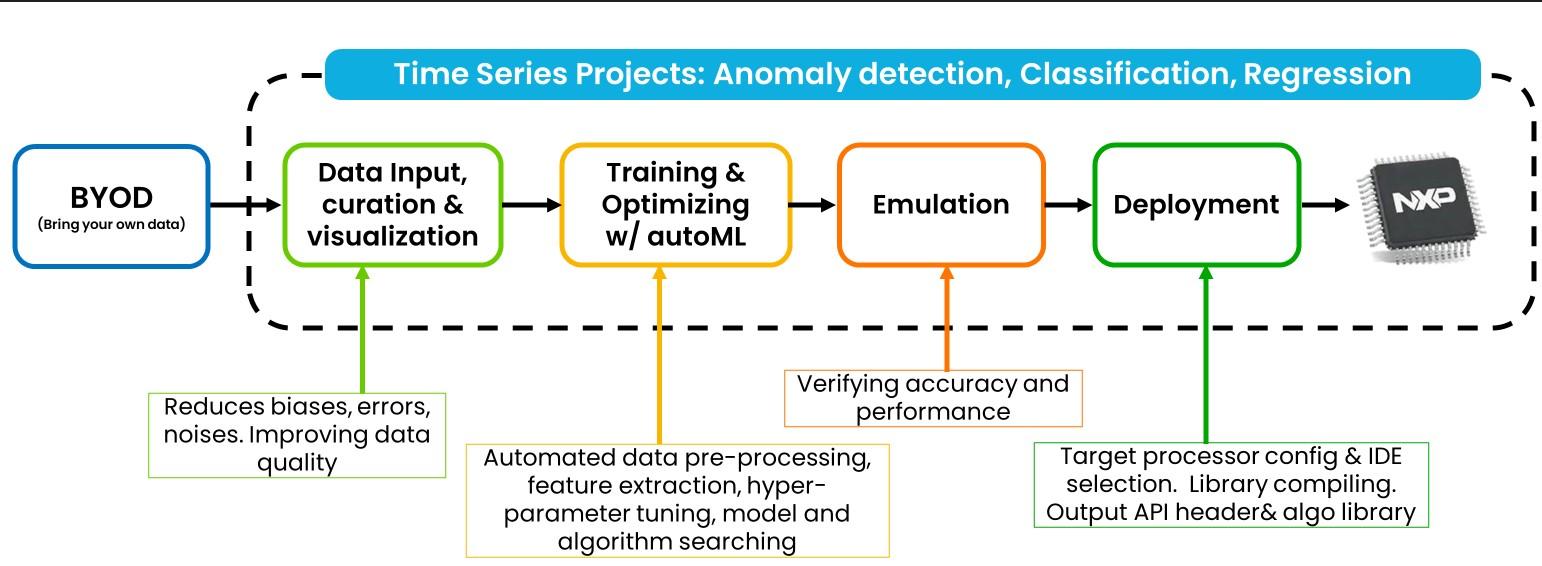
It supports time series dataset input that the customer completely owns.
Based on the input dataset, it automatically trains and outputs a list of the best classical machine learning models or a selected deep learning model.
Generates the algorithm header file and runtime library for the selected CPU core.
Bring Your Own Model (BYOM)
The following diagram illustrates the complete BYOM workflow.
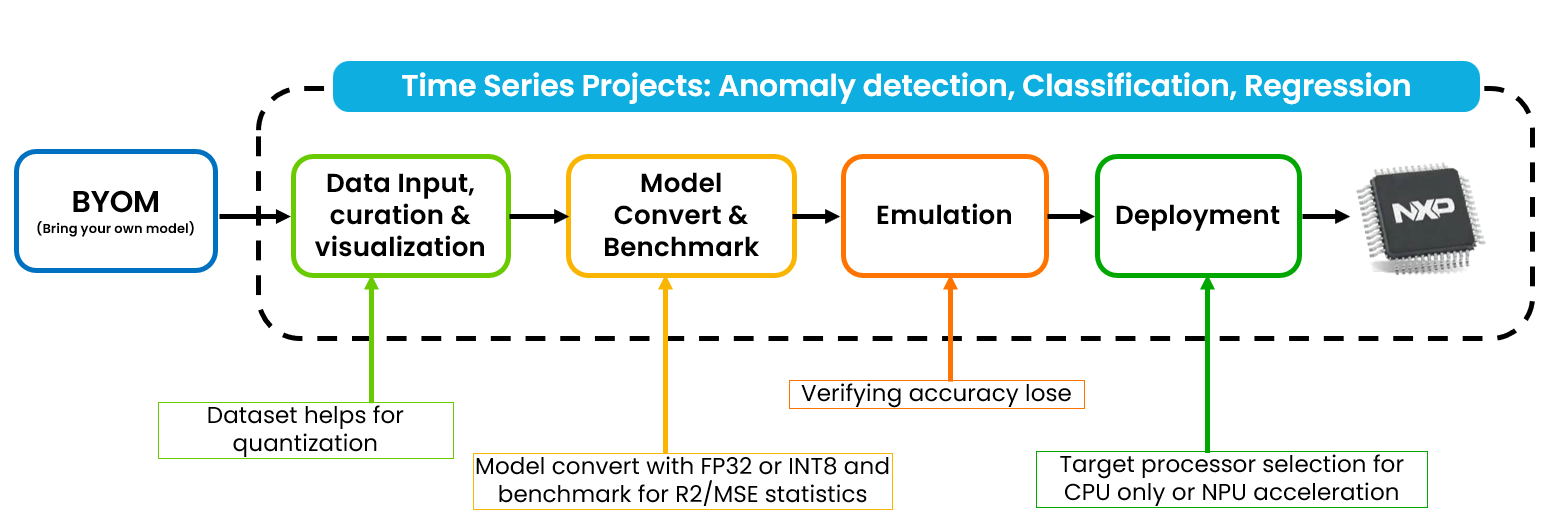
It supports time series deep learning model input that the customer completely owns.
From the dataset input, it automatically quantizes with R2/MSE benchmark and emulation test accuracy result.
It generates the algorithm header file and runtime library for a selected CPU core or NPU accelerator.
System Architecture
The following diagram illustrates the system architecture.
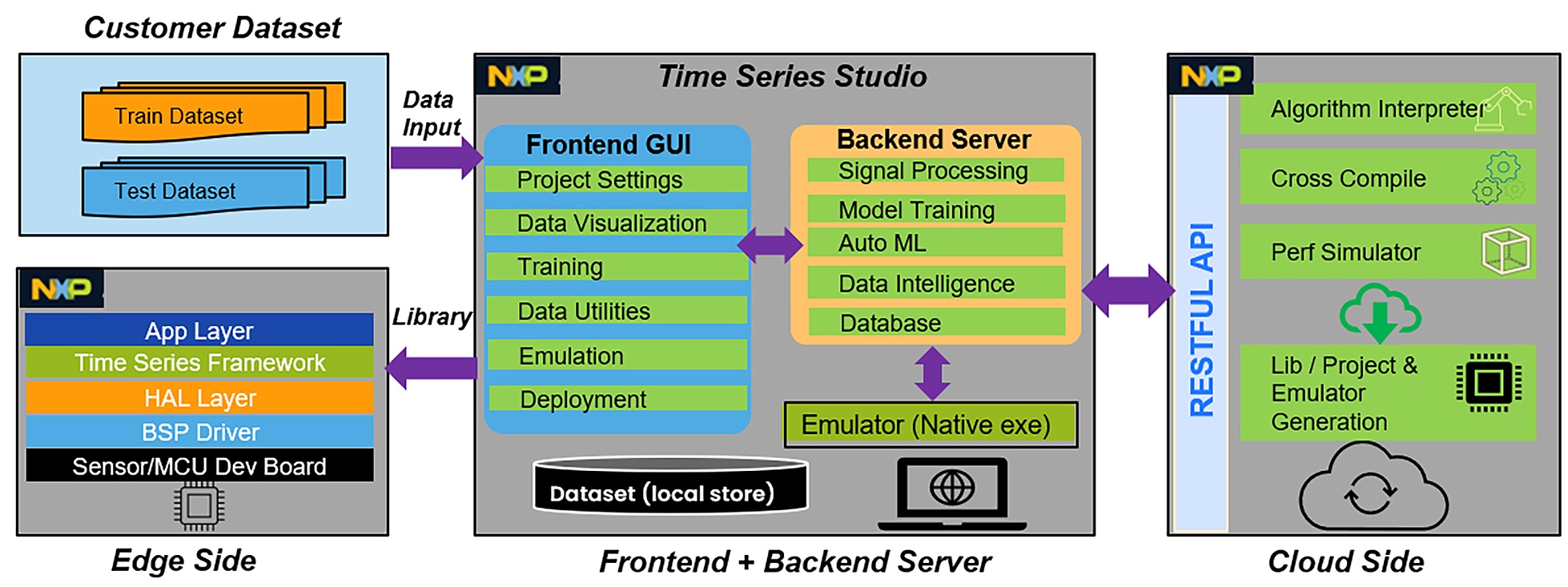
The eIQ Time Series Studio consists of a GUI-based front-end, a shell command-based backend server, and a cloud server for source code generation. It supports different IDE compilers, emulators, and library deployment. eIQ Time Series Studio has a scalable architecture that supports flexible deployment and rapid development. The main blocks with function descriptions are listed below.
Customer Dataset
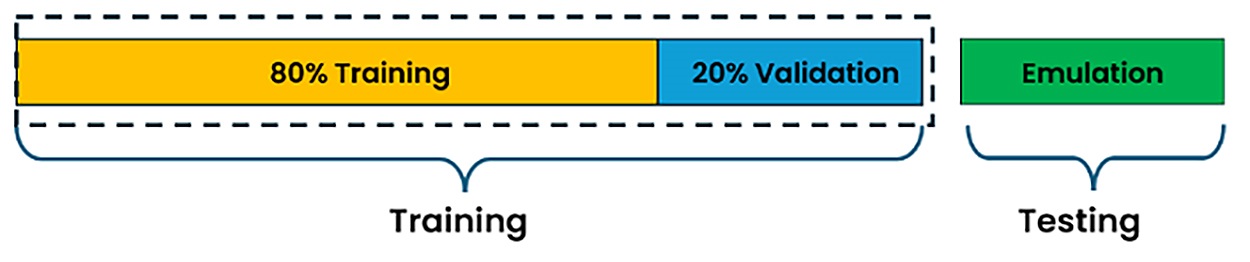
You manage your own dataset collection, cleaning, and formatting to fit training and testing purposes. The section Time Series Data explains the dataset format required by different tasks. In general, the dataset is split into training and testing parts. For the training dataset, you must specify the ratio for training and validation during the auto machine-learning process. By default, the ratio is configured to 8:2. However, you can change it to a different ratio as allowed by the IDE before starting training.
The following diagram illustrates dataset splitting.
Training Dataset
Used for model training. A suitable size and ratio of training/validation provides better accuracy and emulation results.Testing Dataset
Used for real testing in emulation. The separate test dataset verifies if the model overfits and has good generalization.
Note:
The dataset is the core asset owned by you, the customer. Using the IDE keeps the dataset safe on your local machine. NXP never uses or requests your dataset.
Front-end
The front-end is based on a user-friendly GUI design to support cross-OS (Windows/Linux) and communicate with the backend engine server. The main functions of the front-end are listed below.
Task Selection
Enables you to select algorithm application tasks. The options are “Anomaly Detection”, “n-Class Classification”, “1-Class Classification” and “Regression”.Project Settings
Configures hardware resources like CPU type, flash, and RAM size limits. Also specifies the dataset definition.AutoML Project
Creates an AutoML project to enable users toBring Your Own Datafor model training, emulation, and deployment.BYOM Project
Creates aBring Your Own Modelproject to enable users to import their own deep learning models for model quantization, emulation, and deployment.Dataset Input
Supports data file loading, error checking, and data visualization for different domains and operations.Model Training
Supports training configuration and auto machine learning to get the best accuracy models ranking list. Shows training progress.Model Input
Supports BYOM to load deep learning models for model conversion, model network visualization, model quantization, and benchmark results generation.Model Benchmarking
Shows all benchmark details like accuracy, flash and RAM size, confusion matrix, and other metrics for different tasks.Model Emulation
Supports emulation and generates a final C code library that runs on a PC. This helps confirm if the algorithm has an accuracy gap.Model Deployment
Supports different CPU cores for MCUXpresso project generation, and supports GCC, Keil, IAR, or CodeWarrior IDE library generation with different compiler options.Data Logging
Supports capturing sensor datasets through a COM port on your hardware kit or an NXP development board.Data Labeling
Supports creating different labels and visualizing raw continuous data with specific labels for each dataset section.Data Operation
Supports a series of data operations to convert raw continuous data to segmented dataset, operating the segmented dataset to training format.Data Intelligence
Supports smart analysis of continuous or segmented datasets to get the best segmentation suggestions for better accuracy.Solutions
Supports various product-oriented solutions such as quick wizards for building the final optimized library from raw dataset import.
Backend Server
The backend server accepts requests from the front end as the command engine for training, cloud server communication, database management, and more. All training takes place on the backend server, ensuring that the dataset stays protected on your local machine. The following are the main functions of the backend server.
Data Features
Supports converting raw data to temporal, statistical, and spectral domains for different features generation, as requested from the front-end.Data Utilities
SupportsData Logging,Data Labeling,Data Operation, andData Intelligenceutilities to help users easily prepare datasets.Auto Machine Learning
Automatically traverses to minimize the search space for the best algorithm parameters across different machine learning models and technologies.Database Management
Saves all operation statuses and keeps all finished or unfinished jobs in a local database to help manage and search results.Emulation
Supports communication with the cloud server to request and execute test jobs and manage local emulation reports.Deployment
Supports communication with the cloud server to request algorithm libraries or MCUXpresso projects for specific CPU compiler options and IDEs.
Cloud Server
NXP owns the cloud server to support new features, new sample applications, bug fixes, new version upgrades, and more. Also, the cloud server is in charge of algorithm library generation and executable binary emulator generation.
Interpreter
Translates all trained algorithm descriptions into edge device-optimized C/C++ source code.Cross Compiler
Supports different toolchains to set up compilation environments and compile for specific libraries.
Supports different CPUs to compile with X86, ARM, or DSC libraries.Library and Emulator Generator
Supports emulation or device deployment to generate executable files or libraries.
Edge Device
The Edge device generates a standalone algorithm library and an API header file to help you integrate it into your project. Supports generating the whole MCUXpresso project package for compilation with zero coding. Deployment with all sample code contains:
Application Layer
Sample source code for different applications.Time Series Framework
Open source code for the time series framework, which is hardware independent, supports multiple sensors, and enables multi-model pipelines.HAL (Hardware Abstraction Layer)
Open source code for the HAL layer to implement virtual devices, which are defined in the framework. Many sample codes are available.BSP Driver
The OS/driver source code is generated from the NXP SDK package. The source code is kept clean and untouched for easy maintenance.Sensor/MCU Board
Only supports NXP standard development boards, listed in the project settings drop-down list.
System Requirements
Before using eIQ Time Series Studio, ensure that your development host meets the following requirements.
A standard x64 PC with a minimum of 32 GB RAM, 16 GB of available disk space, and a recommended 1080p resolution display.
An internet connection is required for emulation and algorithm library generation, and also for IDE upgrades.
Supported OS:
i. Microsoft® Windows 10 and Windows 11.
ii. Ubuntu 22.04 LTS.
Note:
If possible, use a powerful PC or workstation to run eIQ Time Series Studio to speed up training performance. You can also try different OS versions, but NXP has not verified and cannot guarantee them to work properly.
Target Users
The eIQ Time Series Studio is a user-friendly IDE to help you quickly build your prototype without requiring expertise in AI/ML knowledge.
Customers seeking time series machine learning solutions based on NXP SoC.
Students and researchers studying and evaluating time series machine learning solutions.
Main Functions
The following are the key functions of the eIQ Time Series Studio application.
External edge device data logging and saving time series data through the COM port.
Time series data visualization for raw format, temporal, statistical, and spectral domains.
Data logging and data labeling help capture raw sensor datasets and import them for labeling.
Data intelligence and data operation functions help analyze and convert continuous data to segmented data.
Anomaly detection algorithm searching with user data and memory/flash restriction requirements.
N-Class Classification algorithm searching with user data and memory/flash restriction requirements.
1-Class Classification algorithm searching with user data and memory/flash restriction requirements.
Regression algorithm searching with user data and memory/flash restriction requirements.
BYOM supports you in converting your DL models for quantization, emulation, and deployment to CPU or NPU accelerators from NXP.
Algorithm candidate list for emulation testing to find any gaps for deployment.
Dynamic algorithm graph generation with signal processing pipeline and model types.
Algorithm library and MCUXpresso project generation for deployment on hardware kits.
Support for multiple toolchains like GCC, ARM (Keil), IAR, and CodeWarrior.